Contexte
Regularly generating restoration points on your PocketMine-MP server is your best insurance policy against data loss caused by faulty plugins, administration errors, or world file corruption. However, including all files from your server's root directory can introduce critical structural conflicts during subsequent restorations.
Learning how to properly filter your backups on the Winheberg gaming panel guarantees a smooth, rapid restoration process, completely free of software bugs.
Why Exclude Specific Directories?
By default, a standard backup mechanism compresses everything inside your server's allocated storage space. In the PocketMine-MP ecosystem, this encompasses system or volatile components that must never be overwritten or transferred from one hosting node to another.
The /bin directory contains the binary execution environment (PHP) specifically compiled for the physical architecture of the host machine running your instance. If the node's global dependencies are updated or if your server is migrated to a newer generation machine, restoring an old /bin folder will cause an instant server crash (binary architecture mismatch error).
Furthermore, including console history files (logs) or past crash reports (crashdumps) unnecessarily inflates your archive size, significantly slowing down compression, transfer, and deployment times.
Creating a Filtered Backup: Step-by-Step
Follow these instructions carefully to ensure a clean, reliable, and sustainable snapshot of your game data.
1. Access the Backup Management Section
- Log in to your management panel at panel.winheberg.com.
- Select your PocketMine-MP instance.
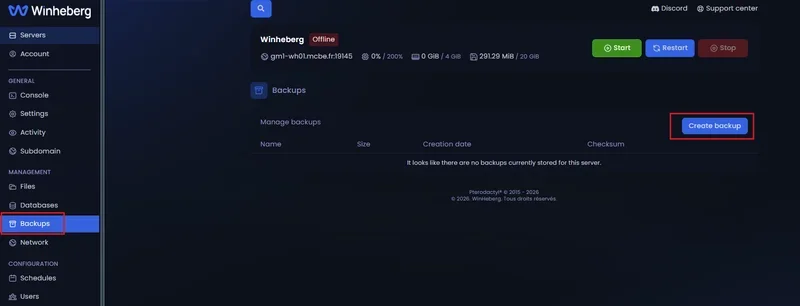
- In the left sidebar menu, click on the Backups tab.
2. Initialize the Archive Configuration
Click the blue Create Backup button located at the top right of the interface to open the contextual configuration window.
3. Configure Exclusion Parameters
In the creation form, fill out the required fields accurately:
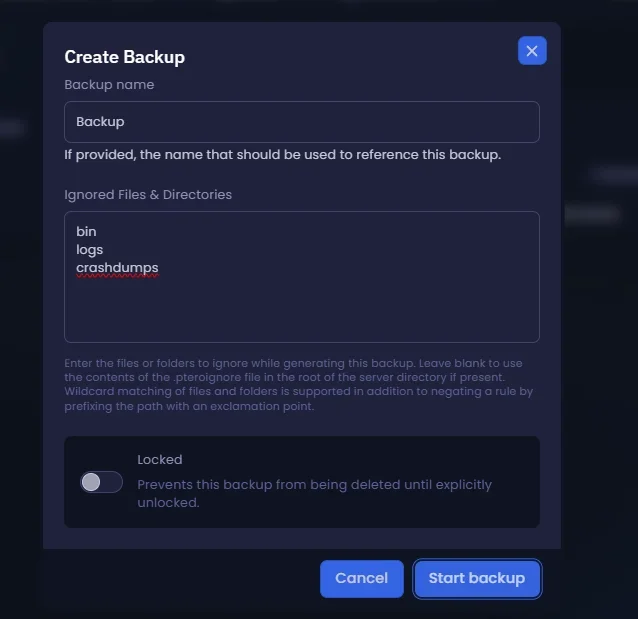
- Backup name: Assign an explicit name to your restoration point for easy identification later (e.g.,
Pre-Update-FactionorWeekly-Backup-01). - Ignored files & directories: This is where the reliability of your archive is determined. Explicitly list the files and directories to exclude from compression. You must write each item on a separate line:
bin
logs
crashdumps
By isolating and excluding the bin, logs, and crashdumps directories, you focus your backup exclusively on your server's vital elements: your worlds (worlds), core configurations (server.properties, pocketmine.yml), and extension databases (plugin_data).
4. Execute the Compression Process
Click the Start Backup button. The Winheberg infrastructure will process the asynchronous compression of your data in the background while applying your filtering rules.
5. Validate Archive Integrity
Once the operation finishes, the archive will appear in the available backups list, displaying its actual file size and assigned name tag. If the total volume seems abnormally heavy, double-check that a subfolder containing massive logs did not escape your filters.
Recommended Exclusions Summary
| Directory / File | Function within PocketMine-MP | Compelling Reason for Exclusion |
|---|---|---|
bin |
Executable binaries and host PHP dependencies. | High risk of CPU architecture conflicts leading to a failed server boot. |
logs |
Textual history of web console operations. | Unnecessarily increases archive size with obsolete log text. |
crashdumps |
Error reports generated during past crashes. | Only useful for immediate live debugging; superfluous for archiving. |
Troubleshooting
❌ The server crashes immediately after restoring a backup
- Bin folder restoration: You most likely forgot to exclude the
bindirectory when creating your archive. To correct this, access the File manager, delete the mistakenly restored/binfolder, then trigger a server file reinstallation through your panel's advanced settings tab to re-inject the correct PHP binaries without touching your worlds.
❌ The panel indicates a failure during backup creation
- Storage or backup quota exceeded: Verify that you have not reached the maximum backup limit authorized by your hosting plan (e.g., limits often restrict accounts to 2 concurrent backups). Delete an old, obsolete restoration point before initializing a new one.
Best Practices for Administration
- Prioritize Cold Backups: Although the Winheberg panel allows "hot" backups (while the server is online), it is highly recommended to perform backups when no users are connected or when the instance is stopped. This eliminates any risk of player inventory corruption during synchronous save writes.
- Externalization Principle: Do not rely solely on your hosting node's local storage. Periodically download your most important archives locally to your personal computer using the action menu (the three vertical dots on the right side of your backup entry line).
- Consistent Milestones: Develop a habit of establishing a systematic backup point before any manual modification to
server.properties, before installing a new extension, or before substantially editing your world configurations.
Need Help?
If your backup processes encounter recurrent failures or if you experience difficulties extracting your configuration files, our engineering teams are ready to step in.
You can submit a support ticket to our Technical department from your client area at billing.winheberg.com by linking your PocketMine-MP subscription for personalized troubleshooting.
Happy configuring and have a great game on your Minecraft Bedrock infrastructure! 🎮