Contexte
You are trying to start your PocketMine server on Winheberg and the console displays an error message indicating that a file or directory cannot be found. This technical issue usually manifests itself through the following characteristic error message.
/entrypoint.sh: line 13: ./bin/php7/bin/php: No such file or directory
The server is attempting to execute PHP from a directory that no longer exists within your container, which immediately blocks the launch of your game instance. On the Winheberg infrastructure, the PHP binary used by PocketMine is deployed automatically when your game version is installed. If you change versions without completing the process or if files have been altered, the startup script can no longer find the required binary.
The solution is to cleanly reinstall the chosen version to restore all essential system dependencies.
Prérequis
- An active PocketMine game server on our platform
- Functional access to our online management panel accessible at panel.winheberg.com
This restoration procedure only targets the PocketMine binary and its associated PHP environment. Your worlds, extensions, and personal configurations stored in your data directories remain perfectly intact.
1. Stop the game server
If your instance is trying to launch in a loop, it should be suspended before making any file modifications.
- Connect to our management tool accessible via panel.winheberg.com
- Select your PocketMine instance from your active services
- On the main interface, click the offline button
- Wait for the status to completely switch to the disconnected state
2. Navigate to the version manager
The management interface brings together all stable versions ready to be deployed on your space.
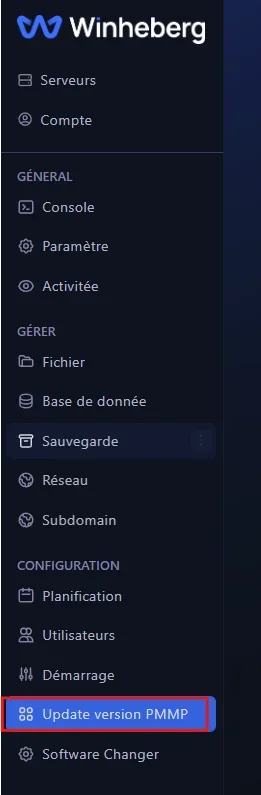
- Go to the side menu located on the left of your screen
- Click on the option named Update version PMMP located in the configuration category
3. Reinstall your PocketMine version
Deploying the version will force the system to rebuild the folder structure and restore the missing system files.
- Identify the game version you want to use for your community
- Click the installation button located to the right of the corresponding line
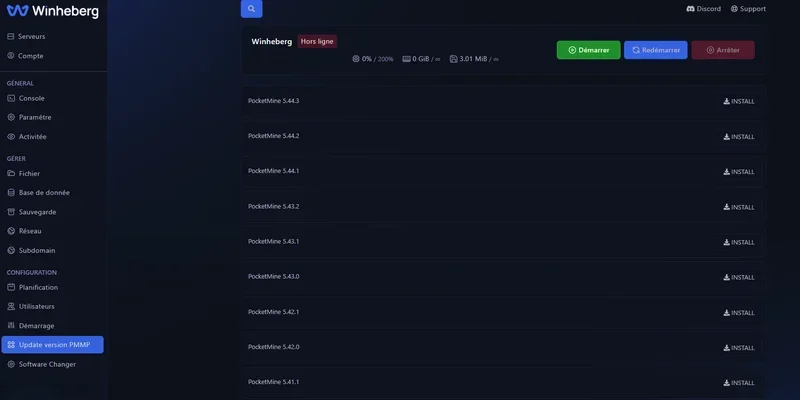
Our team recommends that you systematically select the most recent official version located at the top of the list to benefit from the latest performance fixes developed by the PocketMine developers.
4. Restart your game instance
Once the system files are fully restored, you can proceed to start your environment.
- Return to the home page of your management console
- Click the start button to initialize the server
- Follow the loading of the log lines to confirm the correct execution of the process
The server should now display its complete initialization message indicating the active version without generating any directory blocking.
En cas de problème
If the error message persists despite deploying a new version, several additional checks are required.
❌ Error message persistence at startup
Verify that the initial command line present in your launch configurations has not undergone manual modification. An alteration of the startup variables can direct the system towards a non-existent binary.
❌ Installation button inactive or grayed out
Make sure that the server has fully validated its shutdown before intervening. A complete refresh of your browser usually unlocks the visual interface of the panel.
Bonnes pratiques
Maintaining a clean environment prevents the appearance of corruption or missing files.
- Perform all your software version modifications exclusively from the integrated tools of our panel.
- Avoid manipulating or manually emptying system directories located at the root of your storage space.
- Remember to schedule regular backups of your game data to secure your progression.
Besoin d'aide ?
If your difficulties persist or if you observe abnormal behavior from your console, our team is at your entire disposal to guide you. You can submit a support request to our Technical department by going to billing.winheberg.com and completing the mandatory field for the product concerned.
Your PocketMine server is now operational to welcome your players smoothly 🚀