Context
You just ordered a VPS at Winheberg and need to find its IPv4 address? Whether it's to configure a domain name, connect via SSH, or authorize a remote connection, two simple methods let you retrieve this information.
What is an IPv4 address?
An IPv4 address is your VPS's unique identifier on the Internet. It looks like 82.153.202.X (four numbers separated by dots). It's what lets other machines (computers, browsers, DNS servers) reach your server.
Your Winheberg VPS comes with one dedicated public IPv4 address, assigned as soon as you order and fixed for the entire duration of your subscription.
Prerequisites
- An active Winheberg VPS
- Access to your client area, or failing that, the delivery email received when you ordered
Method 1. From your Winheberg client area
This is the simplest method, accessible at any time without needing to connect to your server.
- Log in to your Winheberg client area at https://billing.winheberg.com
- On your dashboard, find the Your active products/services section
- Click the Manage button next to the VPS you want the IP for
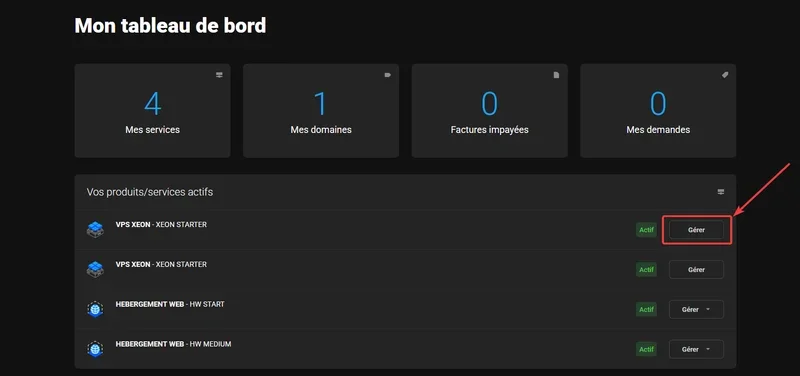
- On the VPS management page, scroll all the way down to the IP Addresses section
- Your VPS's IPv4 address is shown in the IP Address column (for example
82.153.202.X)
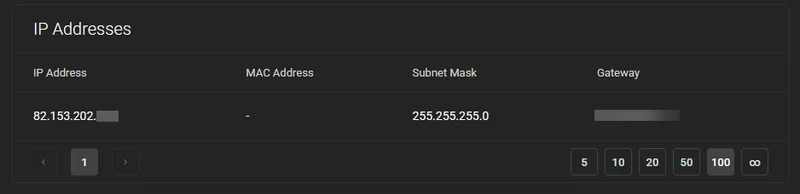
You'll also find additional information there like the Subnet Mask (255.255.255.0 for a typical /24) and the Gateway, useful if you're configuring your network interface manually.
Bookmark this page, it's the fastest place to find your servers' IP at any time.
Method 2. In your VPS delivery email
When your VPS was delivered, Winheberg sent you a summary email with all the connection details.
- Your server's IPv4 address
- The initial username (usually
root) - The generated temporary password
- The default SSH port (
22)
Look in your inbox for a message sent by Winheberg at the time of your order. If you can't find it, check your spam folder or trash.
If you've lost this email, your client area (Method 1) is always accessible with all your information.
Need help?
If you've lost your credentials or can't find your VPS's IP address, our team is here. Open a ticket in the Technical department from your client area and fill in the Related Product field with the VPS in question.
You now know everything you need to find your Winheberg VPS's IPv4 address at any time 🌐